Creative Spelling
This post was originally posted on October 7, 2015 on Sketchbook B. It’s reposted here as part of a project to move some of my favorite writing to my new site.
NOTE: While this page may have useful insights, be aware that it was published more than 10 years ago and may not be relevant for current software versions.
If you’re like me, your clients have all sorts of brand names, executive names, cities and URLs that give InDesign’s spell check fits. But you don’t have to just click “skip” repeatedly during a spell check. Add these to the user dictionary.
Pull up the user dictionary by going to Edit > Spelling > User Dictionary… and add your terms here. If you want a name or URL to be case sensitive, check the case sensitive box.
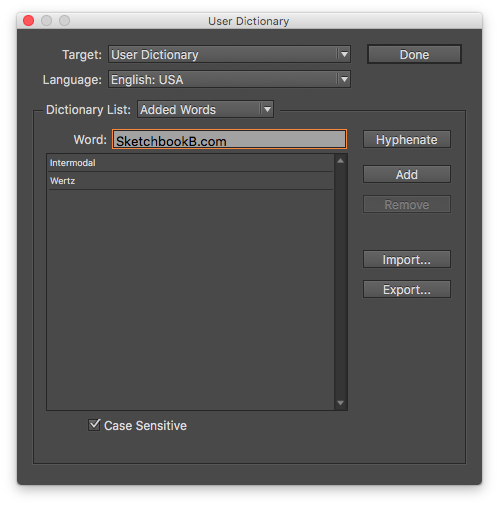
This is particularly helpful for URLs with creative capitalization. If I want “sketchbookb.com” to always be “SketchbookB.com,” I add “SketchbookB.com” to the dictionary and check the case sensitive box. Now if I type “sketchbookb.com” somewhere, spell check will recommend “SketchbookB.com” instead.
Bonus tip: Using the import and export buttons, you can share your user dictionaries with your coworkers.