Grouping Colors in InDesign CC 2014
This post was originally posted on June 25, 2014 on Sketchbook B. It’s reposted here as part of a project to move some of my favorite writing to my new site.
NOTE: While this page may have useful insights, be aware that it was published more than 10 years ago and may not be relevant for current software versions.
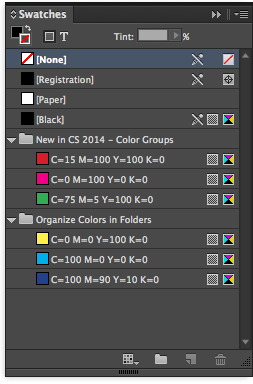
The new versions of Creative Cloud are out, and InDesign has picked up a few new features. One of the minor tweaks will be really welcomed by obsessive compulsive designs.
InDesign CC (2014) now lets you group your colors into folders. Just click the folder icon at the bottom of the Swatches palette to make a new color group.
While it’s a small thing, having the ability to group colors will be helpful or large and complex documents.