Color-coded master pages in InDesign
This post was originally posted on January 29, 2014 on Sketchbook B. It’s reposted here as part of a project to move some of my favorite writing to my new site.
NOTE: While this page may have useful insights, be aware that it was published more than 10 years ago and may not be relevant for current software versions.
If you use master pages in InDesign, it can be difficult to see what master is applied to each page. But you can easily color code your master pages.
Buried in the Pages palette flyout menu (Page Attributes > Color Label) is a command to color code a page. When it’s applied to a Master page, it’s automatically applied to all of the pages that use that Master page. (Color coding can be applied to individual pages as well.)
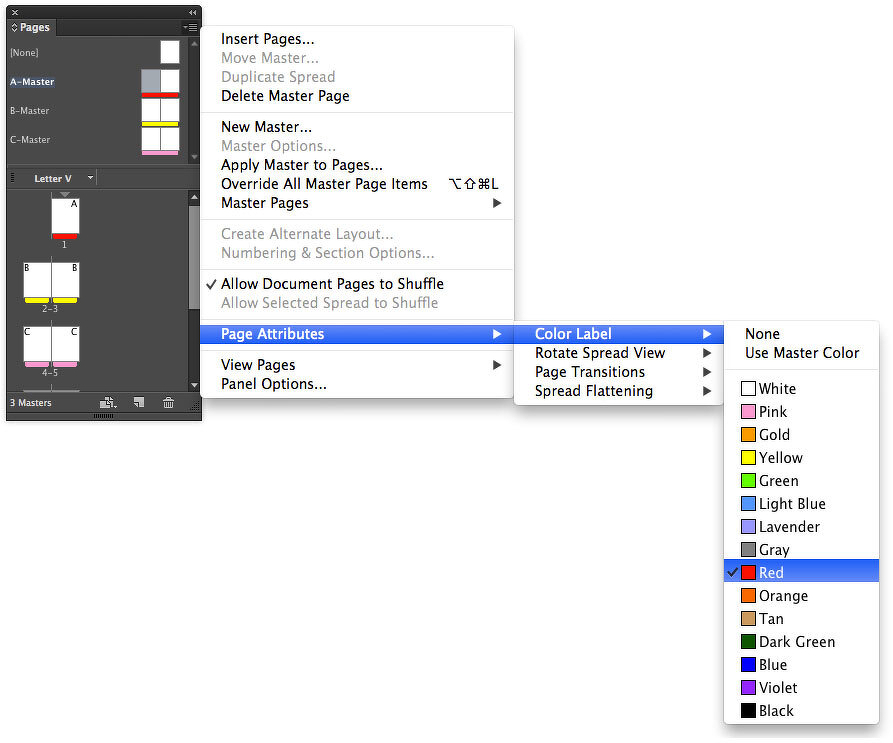
Selecting colors for each of your masters makes it much easier to see which master is applied to each page.
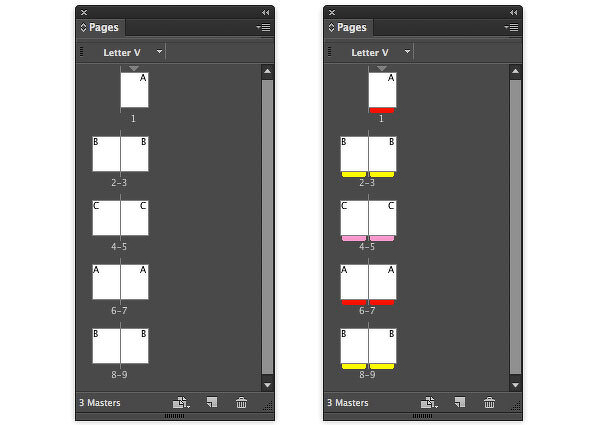
Before and after: It’s now much easier to tell which pages have master pages applied.