The absolute easiest way to control breaks in InDesign CS4
This post was originally posted on May 5, 2009 on Sketchbook B. It’s reposted here as part of a project to move some of my favorite writing to my new site.
NOTE: While this page may have useful insights, be aware that it was published more than 10 years ago and may not be relevant for current software versions.
I mentioned a few weeks ago that in InDesign CS4, you could use nonbreaking hyphens and spaces to control bad breaks in phone numbers and proper names. And you can, but this week, I discovered an even easier technique.
Step one: Highlight the text you want to keep together.
Step two: Go to Character Palette and from the flyout menu, select “No Break.”
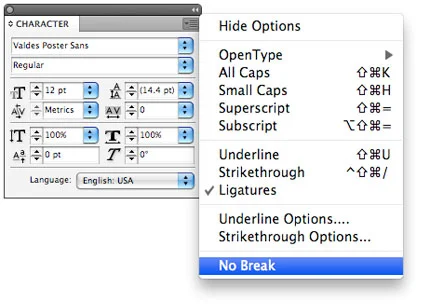
And that’s it. I’ve looked back and this feature is in CS3 as well. It’s probably been there all along and I’ve never noticed…