This post was originally posted on November 18, 2015 on Sketchbook B. It’s reposted here as part of a project to move some of my favorite writing to my new site.
NOTE: While this page may have useful insights, be aware that it was published more than 10 years ago and may not be relevant for current software versions.
I don’t think I’ve ever posted a tip for Adobe Acrobat, but I found something this week that was amazingly helpful.
I had a large file with many pages that I needed to email. (Dropbox and other sharing services weren’t an option for this client. Only email.) I needed to divide the PDF into several smaller PDFs. There are many ways to do this, but most require some trial and error.
I stumbled across a feature in Acrobat that lets you split a PDF into multiple files and allows you to set a maximum file size for each resulting file.
NOTE: I’m writing this tip about the current version of Acrobat that is included with Creative Cloud. The Adobe Acrobat DC (2015) interface is wacky and a radical departure from everything else Adobe makes.* It’s closer to the current version of Microsoft Office than Creative Cloud.
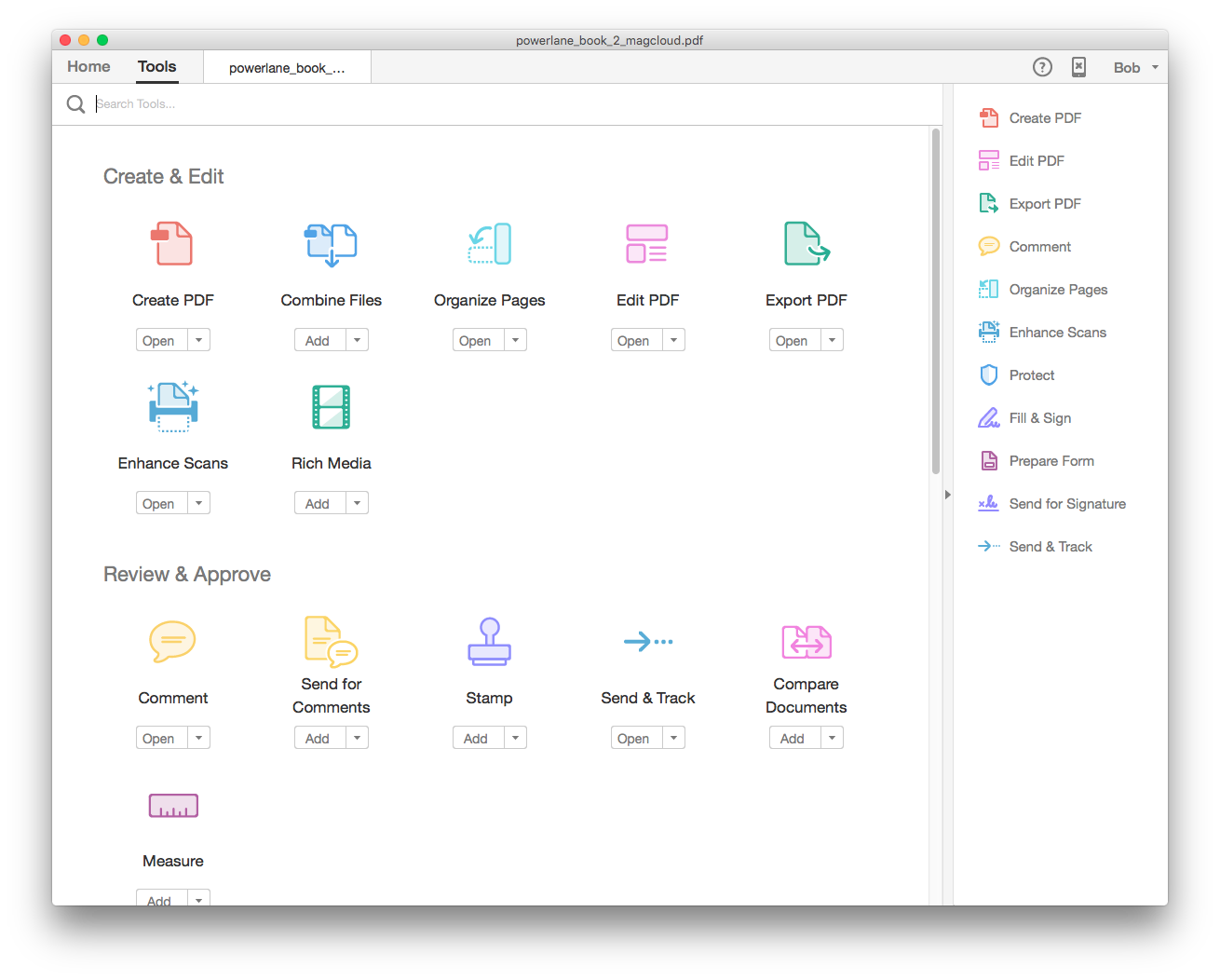
Open your massive PDF and then click “Tools” at the top of the open window. You’ll come to a page with lots of icons for editing functions. Select “Organize Pages” from the “Create & Edit” grouping.
Select “Organize Pages” from the top row.
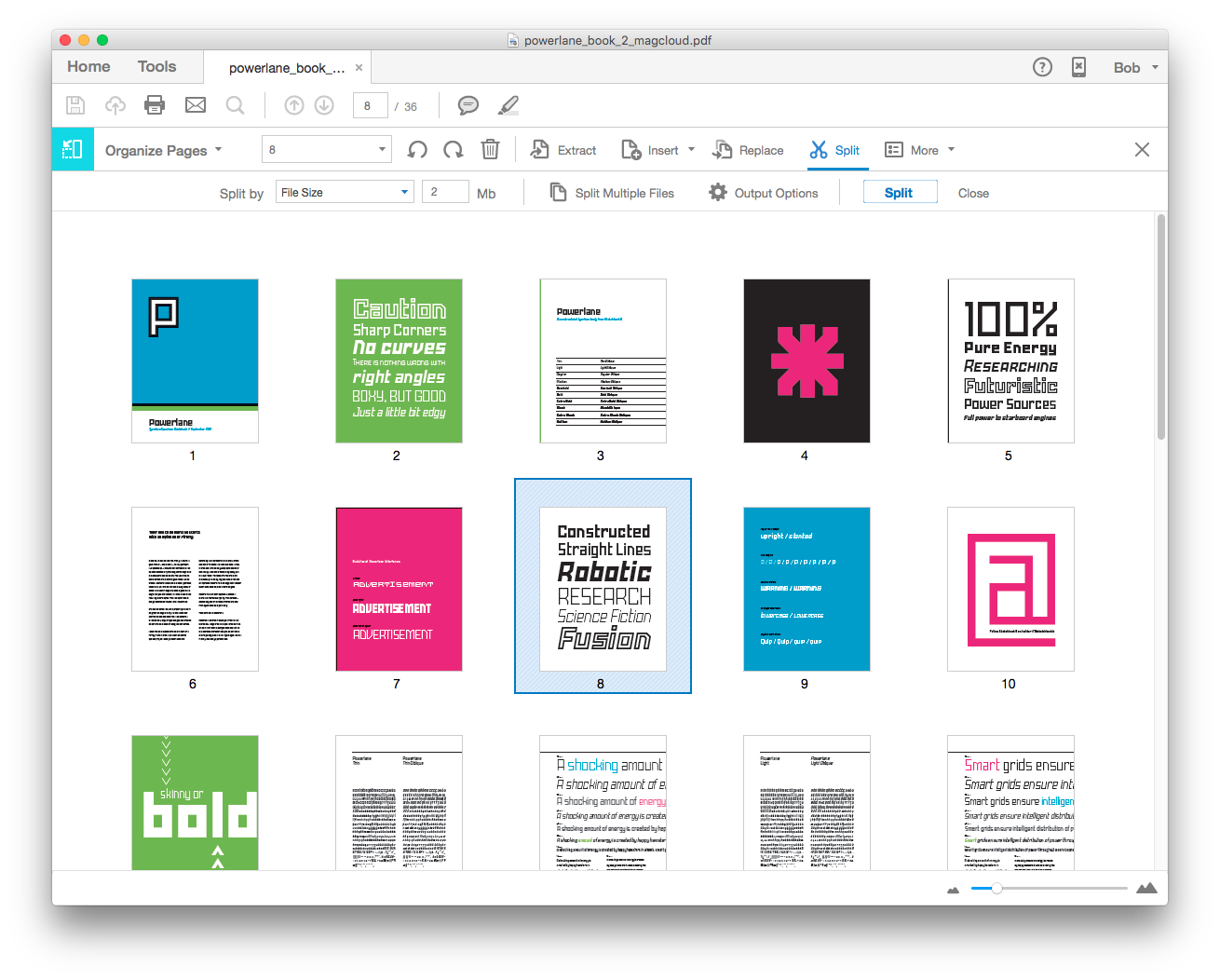
At the top of the window, you will now have an button for “Spilt.” Clicking “Split” opens up a row below with more options. By default, Acrobat will split your document into multiple files with an equal number of pages, but if you select the “Number of Pages” combo box, you get additional options: “File size” and “Top level bookmarks.”
The toolbar for “Organize Pages” has the “Split” command.
Choose file size and then set your maximum file size. Click the split button and the separated files will be saved to your desktop.
The options button for the “Split” row gives you complete control of how and where the files are saved. So if you need to use a particular naming convention or have Acrobat save the new file to a specific directory, you can make those changes there.
If you absolutely need to email a PDF and compressing or downsampling the file isn’t an option for you, then “Split” will absolutely save you time.
* I’ve been told the Acrobat team and the Creative Cloud team are completely separate. It looks like it.
This post was originally posted on November 13, 2015 on Sketchbook B. It’s reposted here as part of a project to move some of my favorite writing to my new site.
I get asked a lot what it’s like to have three kids. Mostly from people with two kids thinking about whether they want to have another. Sometimes, the question comes from younger couples who are thinking about having kids.1 And I always struggle to answer.
My standard answer is that when you have three kids, you have to switch from man-to-man to zone. You lose a little control. You are outnumbered. And while that is completely accurate, it sounds scary and intimidating, which isn’t at all what I want to communicate. I love having three kids.
My other answer is that with three kids, how far apart they are really matters. I’ve had friends with three kids under four years old. For us, our oldest was seven when her brother was born. Those are two radically different situations. But that doesn’t really answer the question.
Sunday morning, an interaction with the kids gave me the answer I was missing. We were waking up and getting ready for church.
Middle child: What are we doing for breakfast?
Me: I don’t know. We’ll probably have a small breakfast now and maybe go to brunch after church.
Youngest: WHAT! We can’t go to a restaurant! We need to go to church! (He LOVES Sunday School.)
Me: We are going to church. We might go out to eat after church.
Youngest: Why can’t we eat at church?
Me: Because they aren’t serving breakfast at church.2
Oldest (from another room): We’re having breakfast at church?!?
And that’s what it’s like having three kids — like adding a person to a game of telephone. It gets a little bit crazier. Funnier. Unpredictable. Often delightful and occasionally frustrating. But never boring.
Bob Wertz is a creative director, type designer, Ph.D. student and researcher living in Columbia, South Carolina. He’s been blogging since 2008.
When my wife and I got married, we weren’t sure we wanted kids. ↩︎
And I was very surprised when they actually had breakfast at church. ↩︎
This post was originally posted on November 11, 2015 on Sketchbook B. It’s reposted here as part of a project to move some of my favorite writing to my new site.
NOTE: While this page may have useful insights, be aware that it was published more than 10 years ago and may not be relevant for current software versions.
This week, I needed to copy pages from one InDesign file to another. Thankfully, it’s super easy.
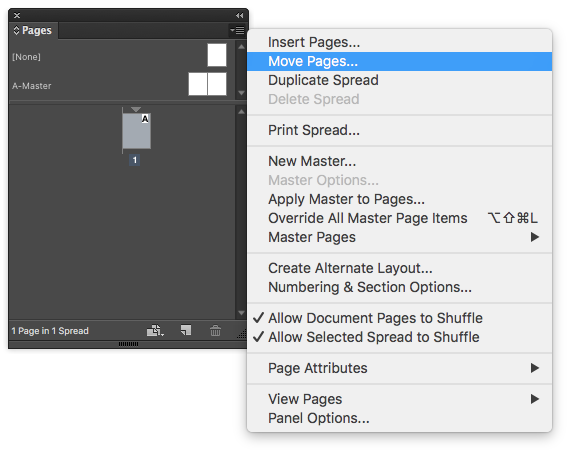
Select the page you want to copy from the pages palette. Choose “Move Pages…” from the flyout menu on the pages palette. (Or Layout > Pages > Move pages…)
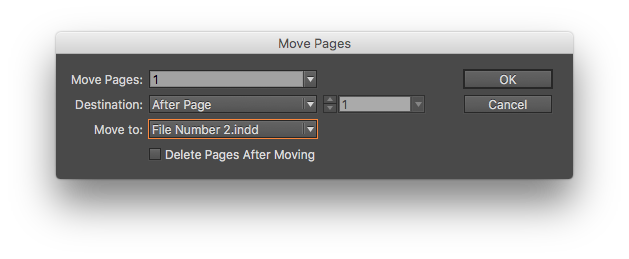
You can then choose which pages* you want to move and where you want to move it. The default is to move the pages to another spot in the same document, but you can select any document that is open.
Select the destination with the “Move to:” combo box.
And you are done. As a bonus tip, there’s a similar trick in Photoshop, too, that I’ve written about in the past.
* In case you were wondering, it doesn’t matter if the documents you are merging are different page sizes.
This post was originally posted on November 5, 2015 on Sketchbook B. It’s reposted here as part of a project to move some of my favorite writing to my new site.
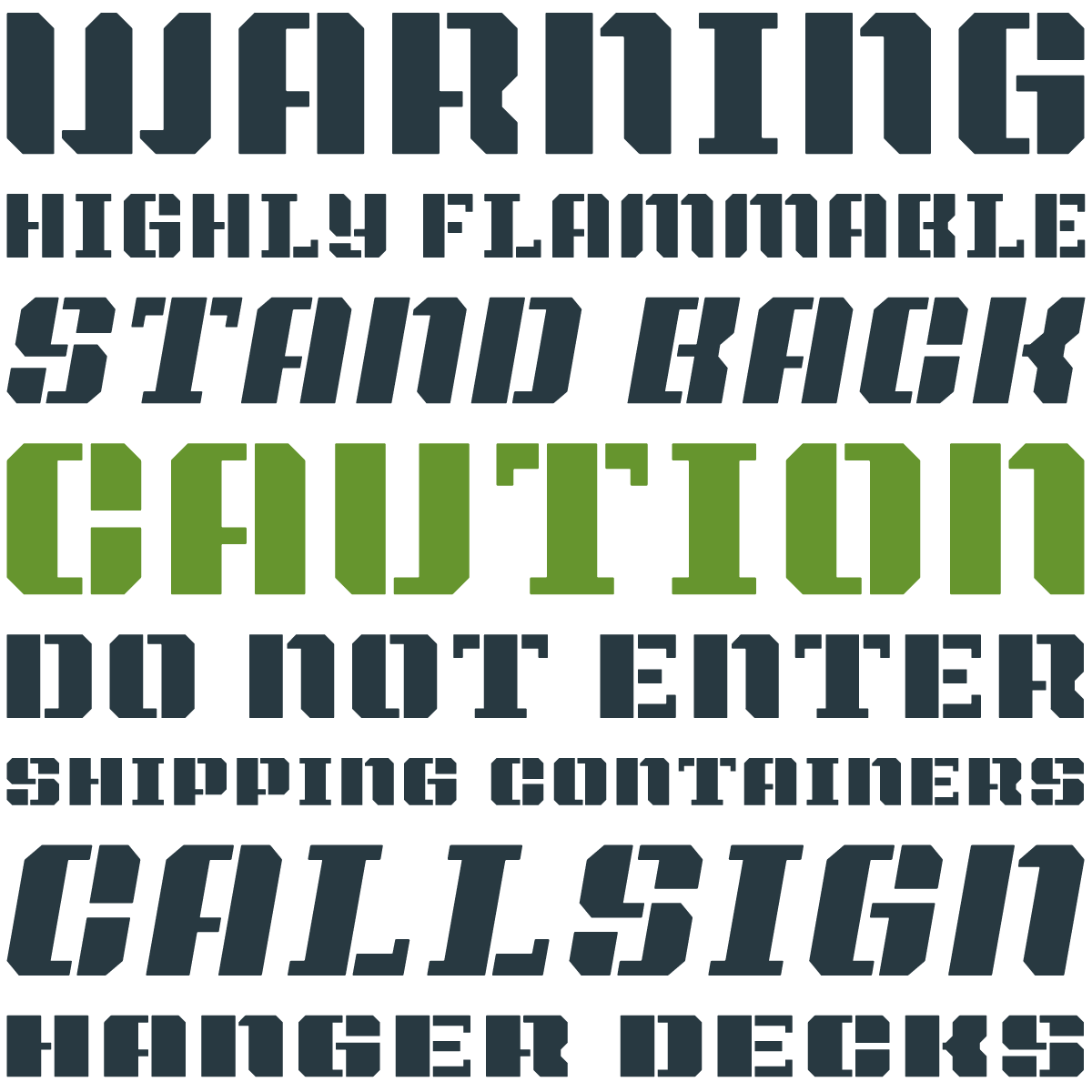
I’ve been fascinated by stenciled type for a while. Stencils started as a practical necessity – an easy and utilitarian way to reproduce type. But the use of stencils has evolved and is now visually representative of industry and military.
A few weeks ago, I quietly rolled out my latest stencil typeface on Creative Market: Intermodal.
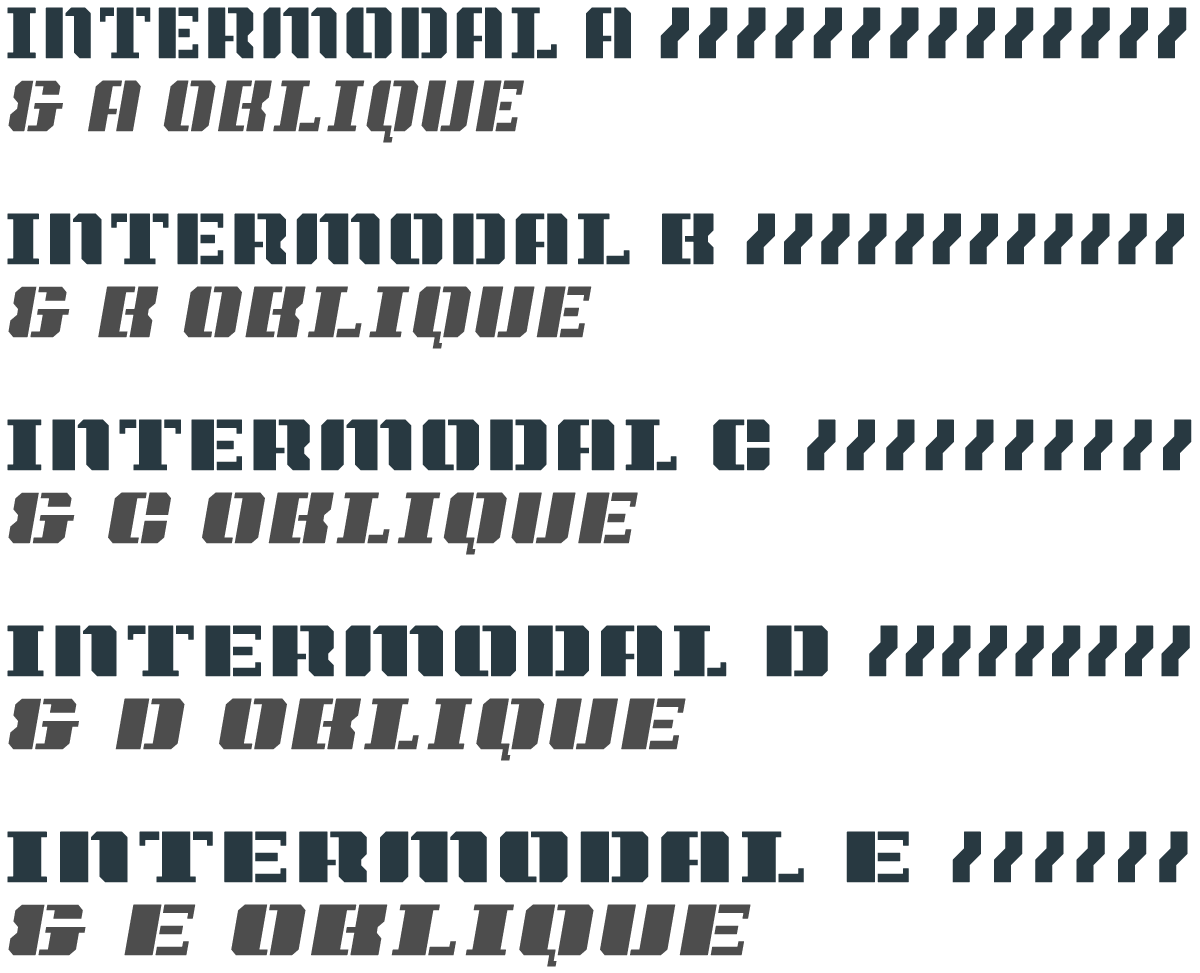
Intermodal started as an experiment. I wanted to create a design that had only vertical stencil cuts. I didn’t like how the cuts on other stencil designs didn’t line up cleanly. By only using vertical cuts, I didn’t have to worry about the horizontal alignment.*
Intermodal is an all cap design, but includes a wide range of foreign language characters, a set of Opentype tabular numerals and an alternate “9.” Intermodal doesn’t have traditional weights. Instead, there are five widths, from A to E. A is more narrow and E is wider. The different versions can be used together to create a utilitarian look. I’ve also got an oblique version of each width for a total of 10 fonts in the family.
Intermodal is one of my favorite creations. I hope you like it.
* After my first set of sketches, I noticed that it was structurally very similar to Power Grid. So I added a stencil version to Power Grid 2.0 and I continued to refine Intermodal. Different look, but similar design approach.
This post was originally posted on November 3, 2015 on Sketchbook B. It’s reposted here as part of a project to move some of my favorite writing to my new site.
When I was a kid, I loved magazines. I was curious about everything and in the 80s and 90s – before the internet — there was a magazine for everything. I got magazines about photography, sailing, model railroading, computers, science, cars, bicycling, comics, art, baseball cards and more. If you wanted to learn about a topic, magazines were a cheap and easy way to find out more. In fact, I read MacUser before I could ever afford my first Mac.
I’d read them cover to cover. And that often included the ads. Ads were an integral part of the experience because they were targeted directly at the magazine’s audience. The ads complimented and supplemented the editorial content.
Some of those magazines are still around*, but blogs and online content are much more efficient ways to gather information, especially for beginners.
Today, ads on blogs are more like billboards than the niche, targeted magazine ads. Many of these blogs serve ads that are from a network and most of those ads have no real connection to the blog’s topic.
Network buys allow advertisers to serve ads only to a target demographic. This seems like a dream situation for many advertisers, but reaching niche audiences is much more difficult. It’s hard to identify from demographics or browsing history who is interested in a topic like cameras or fountain pens.
I’ve been listening to podcasts lately. Podcasts about topics like fountain pens, pencils and space. The ads that run on these podcasts are like the old magazine ads — they support and complement the editorial content. And as a result, I’ve made purchases based on recommendations from ads on podcasts. I can’t say that I’ve ever made a purchasing decision based on a random banner ad.
Context matters. If I was a media buyer today, I’d look closely at podcasting and tightly curated ad networks. They might be the best fit for online advertising to niche markets.
* Still around, but much harder to find. Newsstands are gone in most parts of the country. Bookstores aren’t as common. Grocery stores have smaller and smaller selections of publications.